
 NiceTry12138
be9734a8cd
feat: 添加 GameplayMessageRouter 源码解析
NiceTry12138
be9734a8cd
feat: 添加 GameplayMessageRouter 源码解析
|
5 months ago | |
|---|---|---|
| .. | ||
| Image | 5 months ago | |
| README.md | 5 months ago | |
README.md
GameplayMessageRouter
GameplayMessageSubsystem
一个通过 GameplayTag 触发 或者 监听 事件的系统
USTRUCT()
struct FGameplayMessageListenerData
{
	GENERATED_BODY()

	// Callback for when a message has been received
	TFunction<void(FGameplayTag, const UScriptStruct*, const void*)> ReceivedCallback;

	int32 HandleID;
	EGameplayMessageMatch MatchType;

	// Adding some logging and extra variables around some potential problems with this
	TWeakObjectPtr<const UScriptStruct> ListenerStructType = nullptr;
	bool bHadValidType = false;
};
定义 FGameplayMessageListenerData 来存储一个事件回调
| 属性名称 | 作用 |
|---|---|
| HandleID | 唯一ID |
| MatchType | Tag 的匹配方式 |
| ListenerStructType | 记录事件的 UScriptStruct 类型,当触发时判断触发传入的 UScriptStruct 与 基于的 UScriptStruct 是否相同或者继承 |
| ReceivedCallback | 回调函数 |
这些数据都会存在 GameplayMessageSubsystem 中
private:
	// List of all entries for a given channel
	struct FChannelListenerList
	{
		TArray<FGameplayMessageListenerData> Listeners;
		int32 HandleID = 0;
	};

private:
	TMap<FGameplayTag, FChannelListenerList> ListenerMap;
相同 Tag 可能会触发多个回调函数,所以需要用 TArray 来存储回调数据
在 BroadcastMessageInternal 函数中,可以看到如何触发回调函数
- 通过
Tag,从ListenerMap中找到匹配的回调记录
for (FGameplayTag Tag = Channel; Tag.IsValid(); Tag = Tag.RequestDirectParent())
{
    if (const FChannelListenerList* pList = ListenerMap.Find(Tag))
- 判断是否设置了有效的结构体信息,传入的
StructType与记录的ListenerStructType能否匹配上
if (!Listener.bHadValidType || StructType->IsChildOf(Listener.ListenerStructType.Get()))
{
    Listener.ReceivedCallback(Channel, StructType, MessageBytes);
}
当 Tag 和 缓存信息 都匹配上的时候,触发回调函数
K2_BroadcastMessage
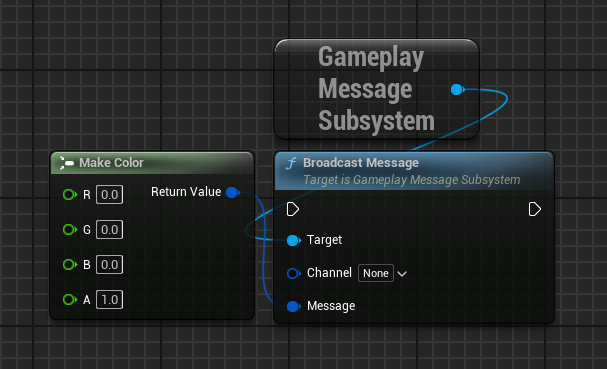
关于 K2_BroadcastMessage
// 定义
UFUNCTION(BlueprintCallable, CustomThunk, Category=Messaging, meta=(CustomStructureParam="Message", AllowAbstract="false", DisplayName="Broadcast Message"))
void K2_BroadcastMessage(FGameplayTag Channel, const int32& Message);

// 实现
void UGameplayMessageSubsystem::K2_BroadcastMessage(FGameplayTag Channel, const int32& Message)
{
	// This will never be called, the exec version below will be hit instead
	checkNoEntry();
}
虽然 K2_BroadcastMessage 函数没有实现,但是该函数的 UFUNCTION 中标记了 CustomThunk,表示这是一个自定义函数
CustomThunk 的记录在 蓝图模板函数 中有记载
K2_BroadcastMessage 真正的实现是在 execK2_BroadcastMessage 中
DEFINE_FUNCTION(UGameplayMessageSubsystem::execK2_BroadcastMessage)
{
	P_GET_STRUCT(FGameplayTag, Channel);

	Stack.MostRecentPropertyAddress = nullptr;
	Stack.StepCompiledIn<FStructProperty>(nullptr);
	void* MessagePtr = Stack.MostRecentPropertyAddress;
	FStructProperty* StructProp = CastField<FStructProperty>(Stack.MostRecentProperty);

	P_FINISH;

	if (ensure((StructProp != nullptr) && (StructProp->Struct != nullptr) && (MessagePtr != nullptr)))
	{
		P_THIS->BroadcastMessageInternal(Channel, StructProp->Struct, MessagePtr);
	}
}
K2_BroadcastMessage 函数由两个参数 Channel 和 Message
Channel 是 FGameplayTag 类型,类型明确,可以直接使用 P_GET_STRUCT 将属性获得
Message 是 const int32& 表示一个地址,是为了让任意类型的结构体数据都可以传入到 Message 中而设计的
明确第二个参数是结构体,所以使用 Stack.StepCompiledIn<FStructProperty>(nullptr) 对 Frame 进行处理,是的当前堆栈指向第二个参数的地址
使用 Stack.MostRecentPropertyAddress 得到值地址,使用 Stack.MostRecentProperty 得到类型信息
UAsyncAction_ListenForGameplayMessage
DECLARE_DYNAMIC_MULTICAST_DELEGATE_TwoParams(FAsyncGameplayMessageDelegate, UAsyncAction_ListenForGameplayMessage*, ProxyObject, FGameplayTag, ActualChannel);

UCLASS(BlueprintType, meta=(HasDedicatedAsyncNode))
class GAMEPLAYMESSAGERUNTIME_API UAsyncAction_ListenForGameplayMessage : public UCancellableAsyncAction
{
    UFUNCTION(BlueprintCallable, Category = Messaging, meta = (WorldContext = "WorldContextObject", BlueprintInternalUseOnly = "true"))
	static UAsyncAction_ListenForGameplayMessage* ListenForGameplayMessages(UObject* WorldContextObject, FGameplayTag Channel, UScriptStruct* PayloadType, EGameplayMessageMatch MatchType = EGameplayMessageMatch::ExactMatch);

    // 其他函数定义

    UPROPERTY(BlueprintAssignable)
	FAsyncGameplayMessageDelegate OnMessageReceived;

    // 其他属性定义
}
UCancellableAsyncAction是继承自UBlueprintAsyncActionBase的
熟悉自定义蓝图异步节点对 UBlueprintAsyncActionBase 肯定不陌生
通过 ListenForGameplayMessages 创建异步节点,并以 OnMessageReceived 新建执行针脚
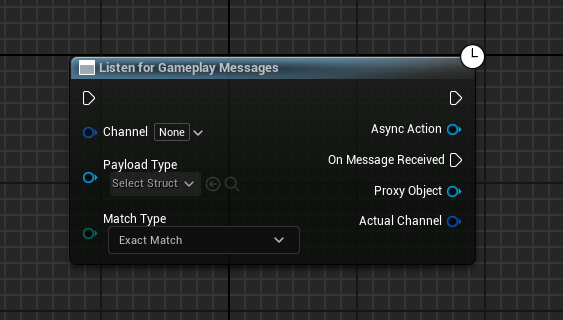
不过可能找不到这个异步节点,因为
UCLASS中配置了HasDedicatedAsyncNode
根据代码,可以发现 ProxyObject 是通过事件传递出来的,AsyncAction 是基类 UCancellableAsyncAction 配置的,其实本质是同一个对象
根据节点的表现情况,可以发现当事件触发时,并没有事件对应的数据信息,也就是 BroadcastMessage 节点的 Message
所以,对节点有两个修改需求
- 隐藏
ProxyObject针脚 - 显示
Payload针脚,也就是事件触发时发送的数据(Message)
为此,需要使用 K2Node 来修改节点的表现效果
class UK2Node_AsyncAction_ListenForGameplayMessages : public UK2Node_AsyncAction
核心接口是 GetMenuActions 和 AllocateDefaultPins
GetMenuActions
首先将 UK2Node_AsyncAction_ListenForGameplayMessages 与 UAsyncAction_ListenForGameplayMessage 进行关联
使用 NodeSpawner->NodeClass = NodeClass 盖默认生成器类型
UClass* NodeClass = GetClass();
ActionRegistrar.RegisterClassFactoryActions<UAsyncAction_ListenForGameplayMessage>(FBlueprintActionDatabaseRegistrar::FMakeFuncSpawnerDelegate::CreateLambda([NodeClass](const UFunction* FactoryFunc)->UBlueprintNodeSpawner*
{
    UBlueprintNodeSpawner* NodeSpawner = UBlueprintFunctionNodeSpawner::Create(FactoryFunc);
    check(NodeSpawner != nullptr);
    NodeSpawner->NodeClass = NodeClass;

    TWeakObjectPtr<UFunction> FunctionPtr = MakeWeakObjectPtr(const_cast<UFunction*>(FactoryFunc));
    NodeSpawner->CustomizeNodeDelegate = UBlueprintNodeSpawner::FCustomizeNodeDelegate::CreateStatic(GetMenuActions_Utils::SetNodeFunc, FunctionPtr);

    return NodeSpawner;
}) );
当创建结点的时候,激活 CreateStatic 函数,将类型、名称都设置回去
毕竟本质上只是想隐藏、添加 针脚,并不是真的要修改节点所属的类
struct GetMenuActions_Utils
{
    static void SetNodeFunc(UEdGraphNode* NewNode, bool /*bIsTemplateNode*/, TWeakObjectPtr<UFunction> FunctionPtr)
    {
        UK2Node_AsyncAction_ListenForGameplayMessages* AsyncTaskNode = CastChecked<UK2Node_AsyncAction_ListenForGameplayMessages>(NewNode);
        if (FunctionPtr.IsValid())
        {
            UFunction* Func = FunctionPtr.Get();
            FObjectProperty* ReturnProp = CastFieldChecked<FObjectProperty>(Func->GetReturnProperty());

            AsyncTaskNode->ProxyFactoryFunctionName = Func->GetFName();
            AsyncTaskNode->ProxyFactoryClass        = Func->GetOuterUClass();
            AsyncTaskNode->ProxyClass               = ReturnProp->PropertyClass;
        }
    }
};
AllocateDefaultPins
调用 Super::AllocateDefaultPins 保持节点不变,只是要隐藏 ProxyObject 并添加 Payload 节点
void UK2Node_AsyncAction_ListenForGameplayMessages::AllocateDefaultPins()
{
	Super::AllocateDefaultPins();

	// The output of the UAsyncAction_ListenForGameplayMessage delegates is a proxy object which is used in the follow up call of GetPayload when triggered
	// This is only needed in the internals of this node so hide the pin from the editor.
	UEdGraphPin* DelegateProxyPin = FindPin(UK2Node_AsyncAction_ListenForGameplayMessagesHelper::DelegateProxyPinName);
	if (ensure(DelegateProxyPin))
	{
		DelegateProxyPin->bHidden = true;
	}

	CreatePin(EGPD_Output, UEdGraphSchema_K2::PC_Wildcard, UK2Node_AsyncAction_ListenForGameplayMessagesHelper::PayloadPinName);
}
UEdGraphSchema_K2::PC_Wildcard表示通配符,什么都能设置进去
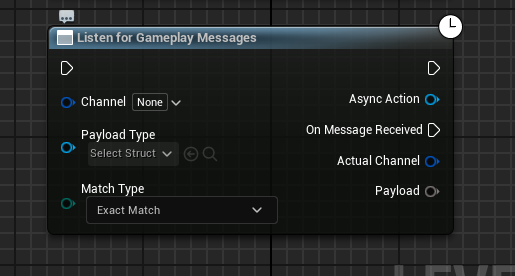
根据 PayloadType 动态设置 Payload 类型
如果 PayloadType 值存在并有效,根据 PayloadType 修改 Payload 的针脚信息
if (PayloadTypePin->DefaultObject != PayloadPin->PinType.PinSubCategoryObject)
{
    if (PayloadPin->SubPins.Num() > 0)
    {
        GetSchema()->RecombinePin(PayloadPin);
    }

    PayloadPin->PinType.PinSubCategoryObject = PayloadTypePin->DefaultObject;
    PayloadPin->PinType.PinCategory = (PayloadTypePin->DefaultObject == nullptr) ? UEdGraphSchema_K2::PC_Wildcard : UEdGraphSchema_K2::PC_Struct;
}
当 PayloadType 针脚的值有修改的时候,触发上面代码,更新 Payload 针脚信息
void UK2Node_AsyncAction_ListenForGameplayMessages::PinDefaultValueChanged(UEdGraphPin* ChangedPin)
{
	if (ChangedPin == GetPayloadTypePin())
	{
		if (ChangedPin->LinkedTo.Num() == 0)
		{
			RefreshOutputPayloadType();
		}
	}
}