
Typescript.md 30 KB
TypeScript
TypeScript
- 加强版的Javascript,让JS更加安全
- JS拥有的特性,TS都支持,紧随ECMAScript标准
- 增加了类型约束,同时扩展一些语法:枚举、元组等
- TS在实现新特性的同时,保持和ES标准的同步
- TS最终会被编译成JS代码,不用担心兼容性
错误出现的越早越好
- 能在写代码的时候发现的错误,就不要代码编译时发现
- 能在编代码编译期发现的错误,就不要在代码运行时发现
- 能在开发阶段发现的错误,就不要在测试阶段发现错误
- 能在测试阶段发现的错误,就不要上线后才发现
类型
数据类型
| 类型 | 作用 |
|---|---|
| string | Typescript中的字符串类型 |
| String | Javascript的字符串包装类的类型 |
| number | Typescript中的数字类型 |
| Number | JavaScript的数字包装类的类型 |
| 类型 | 作用 | - |
|---|---|---|
| number | 数字类型,不区分int和double,统一为number | 基本数据类型 |
| boolean | 仅又true和false | 基本数据类型 |
| string | 字符串类型,可以用单引号或双引号表示 | 基本数据类型 |
| Array | 数组类型(最好类型固定,不要数组中存放多种类型) | 非基本数据类型 |
| null、undefined | ||
| Symbol | 符号 | |
| any | 无法确定变量的类型,并且可能会发生改变的时候使用any | TS特有,JS没有 |
| unknown | 用于描述类型不确定的变量,unknown只能赋值给unknown,any可以赋值给任意类型 | TS特有,JS没有 |
| void | 通常用来指定函数没有返回值,那么返回值就是void类型,可以把null和undefined赋值给void | TS特有,JS没有 |
| never | 永远不会发生的值,如果函数死循环或者抛出异常就不会返回任何值包括void | TS特有,JS没有 |
| 联合类型 | `let n = string | number用 |
| tuple | 元组类型 |
let num : number = 123;
num = 222;

let num1 : number = 100;        // 十进制
let num2 : number = 0b111;      // 二进制
let num3 : number = 0o234;      // 八进制
let num4 : number = 0x29abc;    // 十六进制
// --------------------------------------------------------------
let flag : boolean = true;
flag = (20 > 40);
// --------------------------------------------------------------
let name = "2345";
let name1 = `name : ${name}`;   // 格式化字符串
// --------------------------------------------------------------
let names = [];                 // 默认是any类型数组
let names1 : Array<string> = [];// 不推荐,在react jsx中有冲突
let names2 : string[] = [];     // 推荐
// --------------------------------------------------------------
let info = {
    name : "w",
    age : 1
}
// --------------------------------------------------------------
let n1 : null : null;
let n2 : undefined : undefined;
// --------------------------------------------------------------
let message : any = "hello";    // any运行时不会报错,如果是string就报错了
message = 123;
let anyarray : any[] = [];
// --------------------------------------------------------------
function sum(n1 : number, n2 : number) {
    console.log("hello");
}
let resule = sum(1, 2);         // void类型

// --------------------------------------------------------------
function loopFun() : never {
    while(true){
        console.log("123");
    }
}
function loopFun1() : never{
    throw new Error();
}

// 针对类型做特殊处理,此时忘记处理boolean,所以赋值给never值,此时会报错,做提示之用
function handleMessage(message : string | number | boolean) {
    switch(typeof message){
        case 'string':
            break;
        case 'number':
            break;
        default :
            const check : never = message;
    }
}
handleMessage(true);
// --------------------------------------------------------------
const info:any[] = ["q", 1, 1.0];
let val = info[0];  // val 为any类型,不够安全
const info2 : [string, number, numer] = ["x", 10, 1.0]; // 元组可以确定各个类型
// --------------------------------------------------------------
函数的参数类型
function sum(num1: number, num2: number) : numer{
    return num1 + num2;
}
和变量的类型注解一样,一般而言不需要编写返回类型注解,因为TypeScript会根据return返回值推断函数的返回类型(看个人喜好,编写了可读性更强)
const names = ["1", "2", "3"];
names.forEach(function(item) {

});
一些成员函数可以不写数据类型,因为names是string[],所以item肯定是string类型,Typescript会推导出来
// 对象类型
function printPoint(point : {x: number, y:number, z?: number}){

}

printPoint({ x: 1, y: 2});
printPoint({ x: 1, y: 2, z: 3 });
printPoint({ x: 1, y: 2, z: 3, q : 4 });    // Error
z ?: number 表示可选数据类型,如果没有
z打印是undefined
printPoint目标是一个Object对象,该对象存在键x和y,并且都是number类型,目标对象可以存在名为z的key,也可以不存在z
组合类型
Typescript的类型系统允许我们使用多种运算符,从现有类型中构建新类型
- 一种组合类型:联合类型(Union Type)
- 联合类型是由两个或者多个其他类型组成的类型
- 表示可以是这些类型中的任何一个值
- 联合类型中的每个类型被称之为联合成员(union's memeber)
- 使用时必须小心类型
// id 就是联合类型
function PrintID(id : number | string){
    console.log(id);
}
- 可选类型:可以理解为这个参数是
目标类型 | undefined的联合类型
function foo(message ?: string){
    console.log(message);
}

function foo1(message : string | undefined){
    console.log(message);
}

foo1(undefined);
- 类型别名
type UnionType = string | number | boolean;
function PrintID(id : UnionType){

}
type PointType = {
    x : number,
    y : number,
    z ?: number
}
funtion PrintPoint(point : PointType){

}
类型断言 as
有时候TypeScript无法获取具体的类型信息,这个时候需要使用类型断言(Type Assertions) 通过类型断言,可以把普遍的类型转变成具体类型
document.getElementByIdTS只知道返回HTMLElement,但并不知道具体类型
const el = document.getElementById("img");  // 其实获取到的是img标签
el.src = "图片地址";    // 直接设置img标签的报错

const el1 = document.getElementById("img") as HTMLImageElement;  // 其实获取到的是img标签
el1.src = "图片地址";    // 直接设置img标签的报错

class Person {
}

class Student extends Person {
    studying() {
        console.log("s");
    }
}

function sayHello(p: Person) {
    (p as Student).studying();
}

let s = new Student();
sayHello(s);

// as 的奇淫巧计 别瞎用
const message = "hello";
const num : number = (message as any) as number;
非空类型断言
function printMessage(message ?: string){
    console.log(message.length);
}
printMessage("hello");
printMessage(); // Error message是undefined的

function printMessage2(message ?: string){
    console.log(message?.length);
}
上述代码printMessage不够严谨,message有undefined的可能
为了解决上述代码的不够严谨的问题,引入可选链(就是printMessage2中.?)
type Person = {
    name: string,
    friend?: {
        name: string,
        age?: number,
        girlFriend?: {
            name: string
        }
    }
}

function test(p: Person) {
    console.log(p.name);
    console.log(p.friend?.name);
    console.log(p.friend?.age);
    console.log(p.friend?.girlFriend?.name);
}

let info: Person = {
    name: "x",
    friend: {
        name: "y",
        girlFriend: {
            name: "z"
        }
    }
}

test(info);
使用可选链可以省去复杂的undefined嵌套判断
是Javascript在ES11中添加的功能,非TS增加的功能
!!和??的作用
- !!操作符
- 将一个其他类型转换成
boolean类型 - 类似
Boolean(变量)的方式
- 将一个其他类型转换成
- ??操作符
- 控制合并操作符是一个逻辑操作符
- 当操作符的左侧是null或者undefined是,返回其右侧操作数,否则返回左侧操作数
const message = "hello";
const flag = Boolean(message);
console.log(flag);
const flag1 = !!message;
console.log(flag1);
const flag2 = (!(!message));
console.log(flag2);
(!!message)的操作可以理解为两部分:(!message)将message转换成boolean类型并取反,再通过!把值转换回来
const message = "321";
const result = message ?? "123";
console.log(result);
字面量类型
TS中字面量类型的类型和值必须相同
let message : "hello" = "hello";
let msg : 123 = 123;
通过上述代码可见,字符串也可以当作数据类型
虽然看起来不知道有什么用,但是配合联合类型就可以完成enum的功能
type Alignment = 'left' | 'right' | 'center' | 'top';
let align : Alignment = 'left';
align = 'right';

type Method = 'Get' | 'Post';
function requests(url : string, method : Method){}

let options = {
    url : "",
    method : "Post"
}

requests(options.url, options.method);   // Error : options.method是字符串类型,不一定是"Post"/"Get"
requests(options.url, options.method as Method);

type Requested = {
    url: string,
    method: Method
};

let options2 : Requested = {
    url : "",
    method : "Post"
}
requests(options2.url, options2.method);
通过字面量类型和联合类型,可以限制变量的值的内容
类型缩小
类型缩小
- 类型缩小的英文:Type Narrowing
- 通过类似
typeof padding === "number"的判断语句,来改变TypeScript的执行路径 - 在给定的执行路径中,可以缩小比声明时更小的类型,过程称之为缩小
typeof padding === "number"称之为类型保护(type guards)
常见的类型保
- typeof
- 平等缩小(===, !==,==, !=, switch)
- instanceof
- in
- ...
就是逐渐缩小变量的类型的范围的过程
// typeof
function printID(id : number | string){
    if (typeof id === 'string'){
        // 从联合类型到确认为string类型
        console.log(id.toUpperCase());
    } else {
        // 从联合类型到确认为number类型
        console.log(id);
    }
}

// 平等缩小
type Alignment = 'left' | 'right' | 'center' | 'top';
function printDirection(direction : Alignment){
    switch(direction){
        case 'left':
            break;
        case 'right':
            break;
        case 'center':
            break;
        case 'top':
            break;
    }
}

// instanceof 判断对象类型
function printTime(time : string | Date){
    if (time instanceof Date){
        console.log(time.toUTCString());
    } else {
        console.log(string);
    }
}

// in
type Fish = {
    swimming: () => void;
}
type Dog = {
    running: () => void;
}
function walk(animal : Fish | Dog){
    if ('swimming' in animal){
        // 判断为Fish类型
        animal.swimming();
    } else {
        animal.running();
    }
}
函数类型
- 函数作为参数时
function foo(){

}

function bar(fn : ()=>void){

}

bar(foo);
·()=>void是函数类型,不是匿名函数
- 函数作为变量
type AddFnType = (num1 : number, num2 : number) => number  ;
let add : AddFnType = (num1 : number, num2 : number) => {
    return num1 + num2;
}
- 参数的可选类型
可选参数name ?: type必须写在最后,本质其实就是name : type | undefined,所以name其实可能为undefined,需要对name为undefined的情况做处理
function foo(x: number, y?:number){

}
- 参数默认值
function foo(x : number, y : number = 100){
    console.log(x, y);
}
function foo1(x : number = 20, y : number){
    console.log(x, y);
}
foo(20);
foo1(undefined, 30);
- 剩余参数
使用...nums : number[]作为剩余参数
JS部分有讲
function sum(...nums : number[]) : number{
    if(nums.length == 1){
        return nums[0];
    }
    let val = nums[0];
    nums = nums.slice(1);
    return val + sum(...nums);
}
console.log(sum(1, 2, 3, 4, 5, 6));
函数的重载
function add(a1 : number | string, a2 : number | string){

    return a1 + a2; // Error 因为 a1 是 number | string 类型, a2 是 number | string类型,这个(number | string)类型没有加法

    if (typeof a1 === 'number' && typeof a2 === 'number'){
        return a1 + a2;
    } else {
        // ...
    }
}
通过判断类型的方法,会导致各种类型判断的问题,突出一个复杂
- 函数的重载:函数的名称相同,但是参数不同的几个函数,就是函数的重载
function add(num1: number, num2: number) : number;  // 定义函数
function add(num1: string, num2: string) : string;  // 定义函数

// 实现函数
function add(num1: any, num2: any){
    if(typeof num1 === 'string' && typeof num2 === 'string'){
        return num1.length + num2.length;
    }
    return num1 + num2;
}

add(1, 2);
add("23", "23");
// 在重载的函数中,实现函数是不能直接被调用的
add(true, false);   // Error
- TS的重载 突出一个难受
- 优先使用联合类型实现,如果联合类型可以实现的话
类的使用
类的定义
- 类定义时,属性必须初始化
class Person{
    name: string = "";
    age: number = 0;

    eating() {
        console.log(this.name, this.age);
    }
}

class Person1 {
    name: string;
    age: number;
    constructor(name: string, age: number){
        this.name = name;
        this.age = age;
    }
    eating() {
        console.log(this.name, this.age);
    }
}
属性要么定义时初始化,要么在构造函数初始化,否则会报错
继承
class Person{
    name: string = "";
    age: string = 0;

    eating() {

    }
}
class Student extends Person{
    sno: number = 0;
    constructor(name: string, age: number, sno: number){
        this.name = name;
        this.age = age;
        this.sno = sno;
    }
    studying() {

    }
}
父类没有定义构造函数
class Person{
    name: string;
    age: string;
    constructor(name: string, age: string){
        this.name = name;
        this.age = age;
    }
    eating() {

    }
}
class Student extends Person{
    sno: number = 0;
    constructor(name: string, age: number, sno: number){
        super(name, age);   // 调用父类的构造函数 super等于父类
        this.sno = sno;
    }
    studying() {

    }
    // 重写
    eating() {
        super.eating();     // 调用父类的eating方法
        console.log("s");
    }
}
父类定义了构造函数
多态
class Animal{
    action(){
        console.log("animal running");
    }
}
class Dog extends Animal{
    action(){
        console.log("Dog running");
    }
}
class Fish extends Animal{
    action(){
        console.log("Fish running");
    }
}
function runAction(animals : Animal[]){
    animals.forEach(animal => {
        animal.action();
    })
}
runAction([new Dog(), new Fish()]);
父类引用指向子类对象
类的成员修饰符
- 类的成员修饰符
- public:任何地方可见,公有的属性、方法(默认public)
- private:仅在同一类中可见,私有的属性、方法
- protected:仅在类自身及子类中可见,受保护的属性、方法
class Person{
    private name: string = "";

    // 封装方法访问属性
    getName(){
        return this.name;
    }
    setName(val: string){
        this.name = newName;
    }
}
只读属性 readonly
- readonly修饰属性时,该属性只能在构造函数中赋值,但是赋值之后不可修改
class Foo{
    age: number = 10;
}
class Person{
    readonly name: string;
    readonly foo : Foo;
    constructor(name: string, foo: Foo){
        this.name = name;
        this.foo = foo;
    }
}

let p = new Person("123", new Foo());
p.name = "234";     // Error
p.foo.age = 20;     // Success
不能修改readonly指向的对象,但是可以修改readonly对象内部的属性
属性的get、set
- 一般而言,私有变量前面会加上下划线
class Person{
    private _name: string;
    constructor(name: string){
        this._name = name;
    }

    // 访问器
    set name(val: string) {
        this._name = val;
    }
    get name() {
        return this._name;
    }
}

const p = new Person('x');
p.name = "y";
类的静态成员
不用new出对象,可以直接通过类名访问的属性和方法
class Person{
    static time: string = "20:00";
    static attendClass(){
        console.log("static function");
    }
}
console.log(Person.time);
console.log(Person.attendClass());
抽象类
- 在定义很多通用的调用接口时,通常会让调用者传入父类,通过多态来实现更加灵活的调用方式,但是父类本身可能不需要对某些方法进行具体的实现,所以父类中定义的方法,我们可以定义为抽象方法
abstract class Shape{
    abstract getArea(): number;
}

class Rectangle extends Shape{
    private width: number;
    private height: number;

    constructor(width: number, height: number){
        super();
        this.width = width;
        this.height = height;
    }

    getArea(){
        return this.width * this.height;
    }
}

class Circle extends Shape{
    private r: number;
    constructor(r: number){
        super();
        this.r = r;
    }

    getArea(){
        return this.r * this.r *3.1415;
    }
}

function makeArea(shape: Shape){
    return shape.getArea();
}
makeArea(new Rectangle(10, 20));
makeArea(new Circle(10));
- 抽象方法(
abstract getArea)必须定义在抽象类中(abstract class Shape) - 如果只给函数加上
abstract而不给类加上abstract是会报错的 - 抽象类中可以实现其他方法,有实现体的方法不用加上
abstract
继承抽象类时,必须实现抽象方法
类的类型
- 用类作为类型
class Person{
    name: string = "123";

    eating() {

    }
}

function printPerson(p: Person){
    console.log(p.name);
}
let p: Person = new Person();
let p1: Person = {
    name : "x",
    eating() {

    }
}
printPerson(p);
printPerson(p1);
枚举类型
枚举就是将一组可能出现的值,一个个列举出来,定义在一个类型中,这个类型就是枚举类型
枚举允许开发者定义一组命名常量,常量可以是数组、字符串类型
enum Direction {
    LEFT = 100,         // 100
    RIGHT,              // 101
    TOP,                // 102
    BOTTOM = 104        // 104
}
enum Direction2 {
    LEFT = "LEFT",
    RIGHT = "RIGHT",
    TOP = "TOP",
    BOTTOM  = "BOTTOM"
}

function turnDirection(direction: Direction){

}
turnDirection(Direction.LEFT);
turnDirection(Direction.RIGHT);
turnDirection(Direction.TOP);
turnDirection(Direction.BOTTOM);
编程习惯——枚举类型大写
接口
interface
声明对象类型
- 接口类型定义时,会在类型前多加一个
I,表示该类型为interface
// 通过type声明对象类型
type InfoType = {name: string, age: number}

// 接口interface

interface IInfoType = {name: string, age: number}

const info: IInfoType = {
    name: "x",
    age: 19
}
索引类型
- 使用interface来限制对象的索引类型
interface IIndexLanguage{
    [index: number]: string
}

// 限制frontLanguage必须是number索引string
const frontLanguage: IIndexLanguage = {
    0: "HTML",
    1: "CSS",
    2: "JavaScript",
    3: "Vue",
}
函数类型
function calc(num1 : number, num2 : number, calcFn: (n1: number, n2: number) => number){
    return calcFn(num1, num2);
}

type CalcFn = (n1: number, n2: number) => number;
function calc(num1 : number, num2 : number, calcFn: CalcFn){
    return calcFn(num1, num2);
}

interface encrypt {
  (key: string, value: string): string;
}

// 对传入的参数以及返回值进行约束
let md1: encrypt = function (key: string, value: string): string {
  return key + value;
}
console.log(md1('张三', '初一一班'));


let md2: encrypt = function (key: string, value: string): string {
  return key + value;
}
console.log(md2('李四', '初二三班'));
接口的继承
TS的class不支持多重继承,但是interface支持多重继承
interface ISwim{
    swimming:() => void;
}

interface IFly{
    flyin: () => void;
}

interface IAction extends ISwim, IFly{

}

const action: IAction = {
    swimming() {}
}
交叉类型
type WhyType = number | string;
type Direction = 'left' | 'right' | 'center';

// 另一种组合类型的方式:交叉类型
type WType = number & string;

interface ISwim{
    swiming:() => void;
}

interface IFly{
    flying: () => void;
}

type MyType1 = ISwim | IFly;
type MyType2 = ISwim & IFly;

const obj: MyType1 = {
    flying() {

    }
}

const obj1: MyType2 = {
    swimming() {

    },
    flying() {

    }
}
接口的实现
- 推荐使用面向接口编程,降低耦合度
interface ISwim{
    swimming: ()=>void;
}

interface IEat{
    eating: ()=>void;
}

// 类实现接口
class Animal  {

}

class Fish extends Animal implements ISwim, IEat{
    swimming() {
        console.log("animal swiming");
    }
    eating() {
        console.log("animal eating");
    }
}

class Person implements ISwim{
    swimming() {
        console.log("Person swimming");
    }
}

function swimAction(swimer: ISwim){
     swimer.simming();
}

swimAction(new Fish());
swimAction(new Person());
interface 和 type的区别
- interface和type都可以用来定义对象类型
- 如果定义非对象类型,通常推荐使用type,比如前面代码中的:Direction、Alignment、一些Funciton
- 如果定义对象类型,他们是有区别的(推荐使用interface)
- interface可以重复的对某个接口来定义属性和方法
- type定义的是别名,别名是不能重复的
interface IFoo{
    name: string
}

interface IFoo{
    age: number
}

onst foo: IFoo = {
    name : "x",
    age : 10
}
名称相同的interface最后会合并到一起
比如上面的两个IFoo不会报错,最后定义的foo变量需要实现name和age属性
type IBar = {
    name: string;
}
type IBar = {
    age: number;
}
Duplicate identifier 'IBar'
字面量赋值
interface IPerson{
    name: string,
    age: number,
    height: number
}

const p: IPerson = {
    name: "why",
    age: 19,
    height: 198,
    address: "BJ"
};  // Error 多了address属性

let p1 = {
    name: "why",
    age: 19,
    height: 198,
    address: "BJ"
}
let p2: Person = p1;    // Success 可以赋值
console.log(p2);
为什么直接赋值字面量给p变量时会报错
typescript会对{name: "why",age: 19,height: 198,address: "BJ"}进行类型推导=>{name,age,height,address},这个推导出来的类型就是p最后的类型,而这个最后的类型跟IPerson不相同,所以报错
而p2: Person = p1中,是给p2赋值成了p1的引用,在赋值的过程中会进行freshness擦除的操作
freshness擦除操作就是给将p1赋值给p2进行类型检测的时候,将多余的属性进行擦除,不是将属性去除掉,而是类似不考虑多余属性的操作
通过freshness擦除的操作,让函数传参的时候更加灵活
泛型
为了让代码具有很强的可重用性
在定义函数的时候,不决定参数的类型,而是让调用者以参数的形式决定函数参数应该是什么类型
function sum2<Type>(num1 : Type, num2: Type){
    return num1 + num2; // Error Type不一定是可以相加的类型 比如数组
}

function sum<Type>(num1: Type, num2: Type){
    return num1;
}
function sum1<Type>(num1: Type){
    return num1;
}
console.log(typeof sum<number>(20, 30) === 'number');

// 1. 明确传入类型
sum<number>(20, 30);
sum<{name : string}>({name: "x"}, {name: "y"});
sum<any[]>([20], [30]);

// 2. 类型推导
sum1(40);
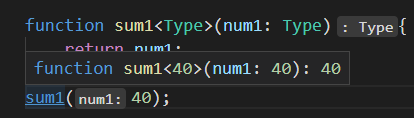
类型推导出来
Type是字面量类型,如果不想是字面量类型就需要sum<number>(40)明确指定类型
function foo<T, V>(arg1: T, arg2: V){
    console.log(arg1, arg2);
}
foo<number, string>(10, "qwer");
泛型接口
interface IPerson<T1, T2>{
    name: T1,
    age: T2
}

let p: IPerson<string, number> = {
    name: "x",
    age: 10
}

interface IStu<T1 = string, T2 = number>{
    name: T1,
    age: T2
}

let p2: IStu = {
    name: "y",
    age: 10
}
泛型接口没有类型推导,所以必须写明类型,例:IPerson
可以使用默认类型,例:IStu
泛型类
class Point<T>{
    x: T;
    y: T;
    z: T;

    constructor(x: T, y: T, z: T){
        this.x = x;
        this.y = y;
        this.z = z;
    }
}

let p0 = new Point<string>("1", "2", "3");
// 类型推导
const p = new Point("1", "2", "3");
泛型类可以类型推导
泛型的类型约束
// 使用联合类型
function getLength(arg: string | any[]){
    return arg.length;
}

interface ILength{
    length: number
}
// 使用泛型
function getLength1<Type extends ILength>(arg: Type){
    return arg.length;
}

getLength1("abav");
getLength1([1, 2, 3, 4]);
getLength1({length: 100});
使用
extends来限制Type的类型或者必须包含的属性等
模块化
// math.ts文件
export function add(num1: number, num2: number){
    return num1 + num2;
}

export function sub(num1: number, num2: number){
    return num1 - num2;
}

// index.ts
import {add, sub} from "./math"
console.log(add(1, 2));
console.log(sub(1, 2));
命名空间
命名空间在typescript早期时,称之为内部模块,主要目的是将一个模块内部再进行作用域的划分,防止一些命名冲突的问题
namespace time {
    export function format(time: string){
        return "2022-1-1";
    }

    function foo(){

    }

    let name: string = "time"
}
namespace price {
    export function format(price: number){
        return "100,000,000";
    }

    function foo(){

    }
    let name: string = "price "
}

export namespace test{  // 导出命名空间
    export function Run(){

    }
}

time.format("1234");    // Success
time.foo();             // Error
time.name;              // Error

// index.ts
import {test} from './test.ts'  //
test.Run();
如果想要函数、自变量可以在命名空间的外部进行访问,需要将其设置为
export
类型的查找
之前我们所有的typescript中的类型,几乎都是我们自己编写的,但是也有用过一些其他的类型
const imageEl = document.getElementById("image") as HTMLImageElement
上述代码中的HTMLImageElement我们没有进行定义或者声明,那么它是从哪里来的呢?
- Typescript对类型的管理和查找规则
之前编写的代码都是.ts文件中的,这些文件最终会输出成.js文件。除此之外,还有另一种.d.ts文件,他hi是用来做类型的声明(declare)。它仅仅是用来做类型检测,告知typescript有哪些类型
- TS会在这些地方查找类型声明
- 内置类型声明:安装typescript时自带的,包括Array等TS内置类型(.d.ts文件))
- 外部定义类型声明:安装的一些库,自带
.d.ts文件,表示对三方库的类型声明 - 安装的三方库中自带
.d.ts类型声明文件 - 安装的三方库,通过社区的公有库
DefinitelyTyped存放类型声明文件- 该库的地址
- 该库查找声明安装方式的地址
- 比如安装react的类型声明:
npm io @types/react --save-dev
- 自己定义类型声明
- 使用的第三方库是一个纯的Javascript库,没有对应的声明文件时,需要自己定义,比如:
lodash - 我们自己的代码中声明一些类型,方便在其他地方直接进行使用
// 内置声明 HTMLImageElement
const imageEl = document.getElementById("image") as HTMLImageElement;

// 自定义类型声明
// MyD.d.ts 自己声明lodash库
declare module 'lodash' {
    export function join(arr: any[]): void;
}