
README.md 19 KB
GAS
思考
关于 GE (Gameplay Effect) 有一些想法
一个 Effect 需要考虑哪些功能呢?
- 配置项
- 周期触发配置项
- 叠层配置项
- 冲突、免疫配置项
- 冲突:该 Effect 生效时,哪些已有的 Buff 会失去效果
- 免疫:该 Effect 生效时,哪些还未添加的 Buff 无法添加或不能生效
- 上下文信息
- Caster:施加者。可以为空,比如场地效果
- Parent:被施加者。不可为空
- Ability:通过 技能 施加。可以为空,比如场地效果,以 技能 形式添加
- 当前 Effect 的 Tag
- 当前 Effect 所处的状态
- BeforeInit
- Init
- Exeution
- Finished
- Destroy
- Caster 被销毁时,是否保持该 Effect
- Parent 被销毁时,是否保持该 Effect
- 对属性进行的操作
- 是否在 UI 上显示
- 阶段触发事件
- 通知 Parent/Caster/Ability 当前 Buff 所处阶段
- 操作配置
- 优先级
- 目标属性
- 操作配置:加、乘、除、覆盖
- 数值配置
- 触发周期配置
- 触发类型
- 直接触发
- 周期性触发,持续一段时间
- 周期性触发,永久存在
- 触发周期间隔时间
- 持续时间
- 是否立刻触发:如果是周期性触发,是否在生效时立刻触发一次
- 叠层机制配置
- 能否叠层
- 最大叠层数限制
- 叠层方案
- 不叠层,刷新当前 buff 的持续时间
- 叠层,不刷新当前 buff 的持续时间,一层一层减少
- 叠层,刷新当前 buff的持续时间,并且更改数值,一层一层减少
- 叠层,刷新当前 buff 的持续时间,并且更改数值,一次性扣完所有层数
- 数值配置
- 配置固定值
- 基于属性百分比
- 数值来源
- Caster
- Parent
- 是否限制取值范围
- 最大值
- 最小值
- 自定义计算流程
- 是否动态计算,也就是运行时计算,还是一直使用添加时的数值
- 简单来说就是,是否锁面板
Attribute
关于属性的思考
- 效果 A:是
Duration类型,持续时间是 3s,Period为 0,作用是 Add HP 50% - 效果 B:是
Instant类型,作用是 Add HP -5
先执行 A,再执行 B
Current Value = 40.0 Base Value = 40.0
Current Value = 60.0 Base Value = 40.0
Current Value = 52.5 Base Value = 35.0
Current Value = 35.0 Base Value = 35.0    // 3s 之后
很明显,由于 Instant 是直接修改 BaseValue,导致效果 A 基于 BaseValue 增加 50% 后计算得到值是 52.5
从玩家体验来看,理论上来说应该扣除 5 点血量,剩余 55 血量,结果实际上是 52.5。对用户来说这就是明显的 Bug
这里关于
Instant属性修改,可以先看下面 GE 的时间周期分类
于是乎,我们想到一种解决方案
以血量为例,除开 HP、MaxHP 之外,再额外加上 ExtraHP 和 Damage
对血量的操作并不直接作用于 HP,而是作用于 ExtraHP
- 假设初始血量为 40
- 使用效果 A,增加血量 50%,此时 ExtraHP 值为 20
- 使用效果 B,减少血量 5点,此时 Damage 值为 5
- 计算得到 HP 的
CurrentValue为 55,即HP + ExtraHP - Damage - 效果 A 时间结束,结束时根据
ExtraHP的值动态修改Damage值,此时ExtraHP为 0,Damage值为 0(因为 20 > 5,如果Damage值为 30,那么效果 A 结束时 Damage 更新为 10) - 计算得到 HP 的
CurrentValue为HP + ExtraHP - Damage= 4
临时性 HP 修改全部作用于 ExtraHP,比如 效果A,或者其他 Buff、Debuff
直接扣除 HP 的全部作用于 Damage
增加当前 HP 的全部作用于 HP
GE
GE 的时间周期分类

GE 的时间配置如上图所示,分为三种类型
| 周期类型 | 作用 |
|---|---|
| Instant | 立即执行一次 |
| Infinite | 永久持续 |
| Has Duration | 持续一段时间 |
Period 用于配置执行周期
根据周期类型的不同,Period 数值的不同,会出现几种不同的情况
| Duration 配置 | 效果 | 解释 |
|---|---|---|
| DurationPolicy: Instant | 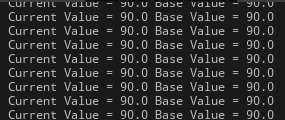 |
修改 BaseValue(current也跟着变) |
| DurationPolicy: Infinite Period: 0.0 |
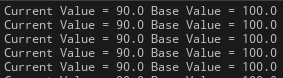 |
只修改 CurrentValue,BaseValue 不变 |
| DurationPolicy: Infinite Period: 1.0 |
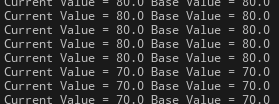 |
修改 BaseValue(current也跟着变) |
| DurationPolicy: HasDuration ScalableFloatMagnitude: 2.0 Period: 0.0 |
 |
修改了CurrentValue,BaseValue不变,2s 后GE消除,CurrentValue 恢复到 100 |
| DurationPolicy: HasDuration ScalableFloatMagnitude: 2.0 Period: 1.0 |
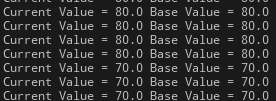 |
直接修改了 BaseValue (current也跟着变) |
分析来看,这是合理的
- 如果一个
Effect是周期性的,但是Period为 0,表示这是一个增益性的 Buff,在持续时间结束后需要清除,所以修改CurrentValue更为合适 - 如果一个
Effect是周期性的,并且Period不为 0 或者这个 GE 是Instant的,那么生效时应该修改BaseValue
但是这是一个隐式的计算过程,对外并不可见,可能会导致使用者的使用错误,所以需要添加额外说明
通过查看源码,可以发现对属性的所有修改操作,会封装成一个 Mod 的数组,基于 BaseValue 和 Mod 数组,最终计算得到 CurrentValue
Mod是Modifier的缩写
关于 UGameplayEffect、FGameplayEffectSpec 和 FActiveGameplayEffect
UGameplayEffect 用于配置,新建的 GE 的资产就是这个
FGameplayEffectSpec 包含 UGameplayEffect 和 对应的运行时信息,比如运行时计算得到的 Duration、Period 等
FActiveGameplayEffect 包含 UGameplayEffect,当一个 GE 是周期性时,会加入到 FActiveGameplayEffectsContainer 容器中,需要记录 GE 执行的 开始时间、下一次执行时间 等信息
综上,不同的配置用于的不同的情况,但是无论如何,一个 GE 只要被应用了,就会创建对应的 FGameplayEffectSpec 实例
GE 的添加流程
以 BlueprintCallable 的 BP_ApplyGameplayEffectToSelf 作为入口
- 通过传入的
TSubclassOf<UGameplayEffect>创建 GE 对象 - 调用
ApplyGameplayEffectToTarget
UGameplayEffect* GameplayEffect = GameplayEffectClass->GetDefaultObject<UGameplayEffect>();
return ApplyGameplayEffectToTarget(GameplayEffect, Target, Level, Context);	注意这里是通过 GetDefaultObject 获取目标的 CDO 对象,也就是说所有
GE 在这里得到的 GameplayEffect 都是同一个对象,这为后面判断堆叠提供了帮助
在 ApplyGameplayEffectToTarget 中
- 通过传入参数创建
FGameplayEffectSpec - 调用
ApplyGameplayEffectSpecToTarget
FGameplayEffectSpec	Spec(GameplayEffect, Context, Level);
return ApplyGameplayEffectSpecToTarget(Spec, Target, PredictionKey);在 ApplyGameplayEffectSpecToTarget 中
- 判断是否需要预测,以此来清空预测键
PredictionKey - 调用
Target->ApplyGameplayEffectSpecToSelf获得 GE 的Handle接下来所有代码都不考虑网络同步和预测的问题 在Target->ApplyGameplayEffectSpecToSelf中 - 检查
- 通过
GameplayEffectApplicationQueries检查当前要添加的 GE 是否有效 - 通过
ActiveGameplayEffects和当前要添加的 GE 检查能否添加- 通过
GEComponent来判断的 - 例如:
AssetTagsGameplayEffectComponent、AbilitiesGameplayEffectComponent等GEComponent配置
- 通过
- 检查当前准备添加的 GE 是否配置了有效的
Attribute
- 通过
- 判断是否是立即执行的 GE
- 如果是立即执行的 GE:
ExecuteGameplayEffect(*OurCopyOfSpec, PredictionKey)直接执行 GE - 如果是持续时间的 GE:
ActiveGameplayEffects.ApplyGameplayEffectSpec添加 GE 到容器中
- 如果是立即执行的 GE:
在 ActiveGameplayEffects.ApplyGameplayEffectSpec 中
- 判断堆叠
- 如果堆叠:更新叠层计数,根据条件刷新持续时间、重置计数器等操作,使用现有的
FActiveGameplayEffect实例 - 如果不堆叠:创建
FActiveGameplayEffect实例
- 如果堆叠:更新叠层计数,根据条件刷新持续时间、重置计数器等操作,使用现有的
- 重新计算
FActiveGameplayEffect数值,收集其绑定的属性 - 计算持续时间和周期,绑定 Timer 到
FActiveGameplayEffect实例上 - 根据是否堆叠触发不同的事件
- 如果堆叠:触发
OnStackCountChange - 如果不堆叠:触发
InternalOnActiveGameplayEffectAdded
- 如果堆叠:触发
在代码中有两个地方使用了 TimeManager
- 第一个 Timer 是在持续时间结束后触发,用于标记效果过期(可以移除效果),只触发一次所以
bLoop设置为 false - 第二个 Timer 是固定时间执行周期性效果(每秒造成1点伤害),需要循环触发所以设置为 true
- 如果 GE 的
bExecutePeriodicEffectOnApplication为 true,表示 GE 添加时立刻执行一次,所以会额外注册一个 TimerManager.SetTimerForNextTick
- 如果 GE 的
// Calculate Duration mods if we have a real duration
if (DurationBaseValue > 0.f)
{
    float FinalDuration = AppliedEffectSpec.CalculateModifiedDuration();
    // 一些判断和特殊数据处理
    if (Owner && bSetDuration)
    {
        FTimerManager& TimerManager = Owner->GetWorld()->GetTimerManager();
        FTimerDelegate Delegate = FTimerDelegate::CreateUObject(Owner, &UAbilitySystemComponent::CheckDurationExpired, AppliedActiveGE->Handle);
        TimerManager.SetTimer(AppliedActiveGE->DurationHandle, Delegate, FinalDuration, false);
        if (!ensureMsgf(AppliedActiveGE->DurationHandle.IsValid(), TEXT("Invalid Duration Handle after attempting to set duration for GE %s @ %.2f"),
            *AppliedActiveGE->GetDebugString(), FinalDuration))
        {
            // Force this off next frame
            TimerManager.SetTimerForNextTick(Delegate);
        }
    }
}

// Register period callbacks with the timer manager
if (bSetPeriod && Owner && (AppliedEffectSpec.GetPeriod() > UGameplayEffect::NO_PERIOD))
{
    FTimerManager& TimerManager = Owner->GetWorld()->GetTimerManager();
    FTimerDelegate Delegate = FTimerDelegate::CreateUObject(Owner, &UAbilitySystemComponent::ExecutePeriodicEffect, AppliedActiveGE->Handle);

    // The timer manager moves things from the pending list to the active list after checking the active list on the first tick so we need to execute here
    if (AppliedEffectSpec.Def->bExecutePeriodicEffectOnApplication)
    {
        TimerManager.SetTimerForNextTick(Delegate);
    }

    TimerManager.SetTimer(AppliedActiveGE->PeriodHandle, Delegate, AppliedEffectSpec.GetPeriod(), true);
}
在 InternalOnActiveGameplayEffectAdded 函数中
- 会根据 GEComponent 来判断当前 GE 能否被激活或者说是否被抑制(
bIsInhibited) - 调用
UAbilitySystemComponent::InhibitActiveGameplayEffect
在 UAbilitySystemComponent::InhibitActiveGameplayEffect 函数中
- 根据 GE 是否被 抑制
- 被抑制:执行
RemoveActiveGameplayEffectGrantedTagsAndModifiers - 不被抑制:执行
AddActiveGameplayEffectGrantedTagsAndModifiers
- 被抑制:执行
- 触发
OnInhibitionChanged事件 - 在
FScopedAggregatorOnDirtyBatch对象析构的时候触发ActiveGameplayEffects.OnMagnitudeDependencyChange属性变化事件OnDirty脏数据事件触发
流程图
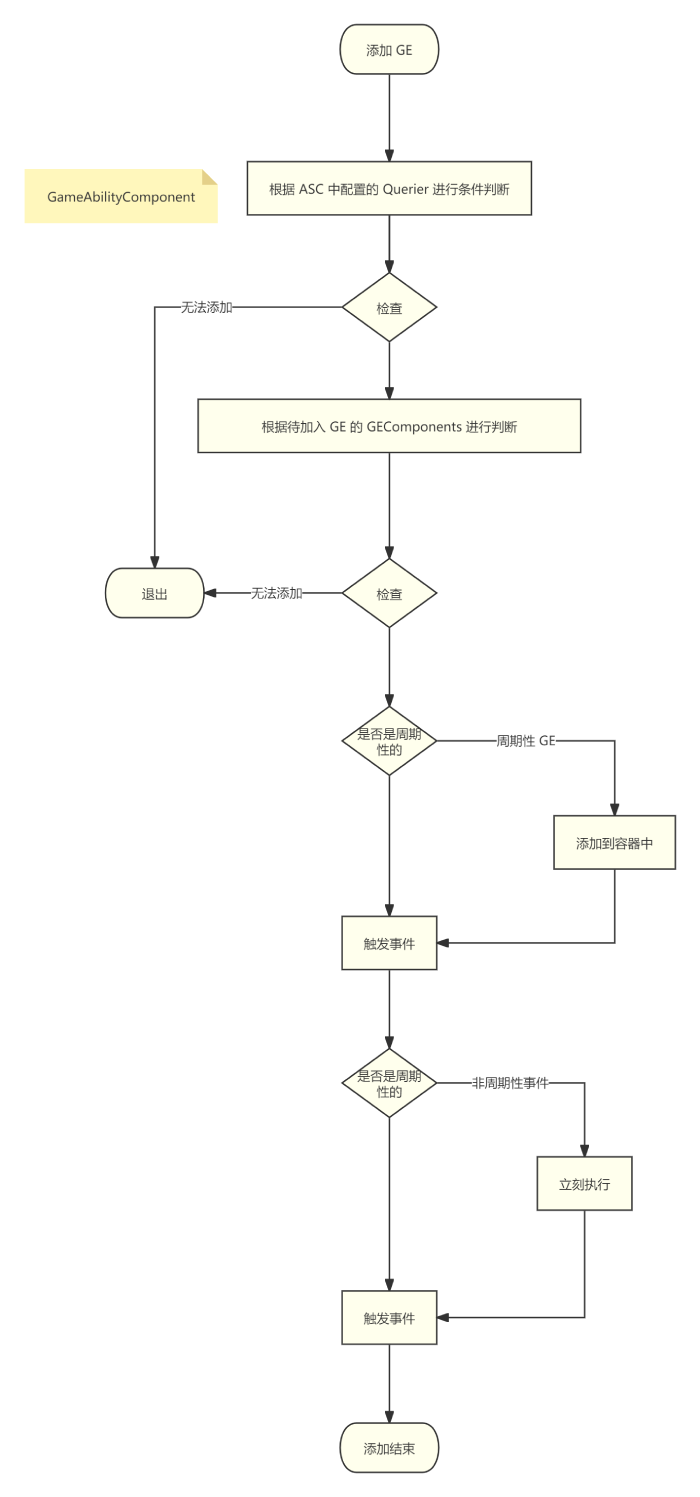

代码执行过程

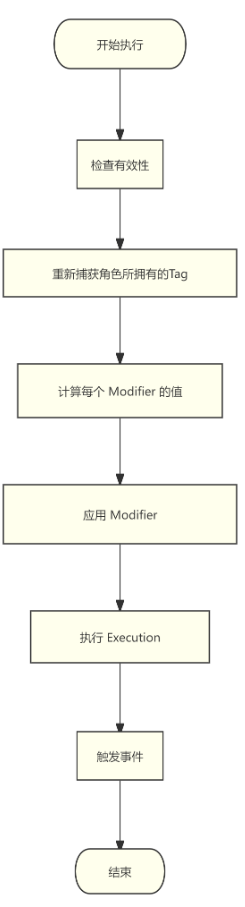
GE 的执行流程
FTimerDelegate Delegate = FTimerDelegate::CreateUObject(Owner, &UAbilitySystemComponent::ExecutePeriodicEffect, AppliedActiveGE->Handle);
根据上面的代码,直接定位执行位置是 UAbilitySystemComponent::ExecutePeriodicEffect
通过函数调用,真正执行的代码在 FActiveGameplayEffectsContainer::ExecuteActiveEffectsFrom 函数中
- 设置
TargetTags即Owner标记上的GameplayTags - 计算
GE的Modifiers - 通过循环调用
InternalExecuteMod应用Modifier - 遍历
Executions数组,计算得到ConditionalEffectSpecs将要附加的 GE - 触发 GC
- 应用
ConditionalEffectSpecs - 最后触发事件
重点在于两个函数 CalculateModifierMagnitudes 和 InternalExecuteMod
在 CalculateModifierMagnitudes 中
const FGameplayModifierInfo& ModDef = Def->Modifiers[ModIdx];
FModifierSpec& ModSpec = Modifiers[ModIdx];

if (ModDef.ModifierMagnitude.AttemptCalculateMagnitude(*this, ModSpec.EvaluatedMagnitude) == false)
{
    ModSpec.EvaluatedMagnitude = 0.f;
    ABILITY_LOG(Warning, TEXT("Modifier on spec: %s was asked to CalculateMagnitude and failed, falling back to 0."), *ToSimpleString());
}
很清晰,通过在 GE 中配置的 Def->Modifiers 计算出 ModSpec.EvaluatedMagnitude 的值
switch (MagnitudeCalculationType)
{
case EGameplayEffectMagnitudeCalculation::ScalableFloat:break;
case EGameplayEffectMagnitudeCalculation::AttributeBased:break;
case EGameplayEffectMagnitudeCalculation::CustomCalculationClass:break;
case EGameplayEffectMagnitudeCalculation::SetByCaller:break;
// ...
}
在 AttemptCalculateMagnitude 中通过枚举,来计算具体的值内容
在 InternalExecuteMod 函数中,核心代码如下
if (AttributeSet->PreGameplayEffectExecute(ExecuteData))
{
    float OldValueOfProperty = Owner->GetNumericAttribute(ModEvalData.Attribute);
    ApplyModToAttribute(ModEvalData.Attribute, ModEvalData.ModifierOp, ModEvalData.Magnitude, &ExecuteData);

    FGameplayEffectModifiedAttribute* ModifiedAttribute = Spec.GetModifiedAttribute(ModEvalData.Attribute);
    if (!ModifiedAttribute)
    {
        // If we haven't already created a modified attribute holder, create it
        ModifiedAttribute = Spec.AddModifiedAttribute(ModEvalData.Attribute);
    }
    ModifiedAttribute->TotalMagnitude += ModEvalData.Magnitude;

    {
        SCOPE_CYCLE_COUNTER(STAT_PostGameplayEffectExecute);
        /** This should apply 'gamewide' rules. Such as clamping Health to MaxHealth or granting +3 health for every point of strength, etc */
        AttributeSet->PostGameplayEffectExecute(ExecuteData);
    }
}
基本流程也很简单
- 调用
PreGameplayEffectExecute判断能否触发 - 添加对应属性修改
ApplyModToAttribute - 添加属性的修改记录
- 设置累加值
- 触发事件
PostGameplayEffectExecute

UGameplayEffectCalculation
UGameplayEffectCalculation 与 UGameplayModMagnitudeCalculation 类似,都是可以自定义属性的计算过程,不同的是 UGameplayEffectCalculation 可以对多个属性进行操作
以 Lyra 项目中的 ULyraDamageExecution 为例
Execute_Implementation(const FGameplayEffectCustomExecutionParameters& ExecutionParams, FGameplayEffectCustomExecutionOutput& OutExecutionOutput)
首先观察参数
ExecutionParams是const &,表示作为输入OutExecutionOutput是&,表示作为输出
通过 ExecutionParams 可以得到 FGameplayEffectSpec 这个 GE 的运行时实例
const FGameplayTagContainer* SourceTags = Spec.CapturedSourceTags.GetAggregatedTags();
const FGameplayTagContainer* TargetTags = Spec.CapturedTargetTags.GetAggregatedTags();

FAggregatorEvaluateParameters EvaluateParameters;
EvaluateParameters.SourceTags = SourceTags;
EvaluateParameters.TargetTags = TargetTags;

float BaseDamage = 0.0f;
ExecutionParams.AttemptCalculateCapturedAttributeMagnitude(DamageStatics().BaseDamageDef, EvaluateParameters, BaseDamage);
收集 Source 和 Target 身上的 Tag,通过 AttemptCalculateCapturedAttributeMagnitude 将捕获的属性 以及 收集的信息 进行计算得到 BaseDamage
捕获的属性是
ULyraCombatSet::GetBaseDamageAttribute()这一步进行计算,得到属性值
接下来就是进行一系列计算:距离衰减、友伤判定、护甲衰减等,得到最终的数值 DamageDone
最后将 DamageDown 应用到属性上
OutExecutionOutput.AddOutputModifier(FGameplayModifierEvaluatedData(ULyraHealthSet::GetDamageAttribute(), EGameplayModOp::Additive, DamageDone));
注意,最开始获取伤害是通过 ULyraCombatSet::GetBaseDamageAttribute 属性,最后应用伤害是在 ULyraHealthSet::GetDamageAttribute
这也是 UGameplayEffectCalculation 的优势点
UGameplayEffectComponent
为了方便配置、提升可扩展性,将 GE 执行的各个流程封装成成 UGameplayEffectComponent,根据各自的需求实现各自的共嫩
从源码来看,UGameplayEffectComponent 内容非常简单
| 函数 | 作用 |
|---|---|
| CanGameplayEffectApply | 检查 GE 是否可以应用到目标,必须所有的 GEComponent 都返回 True ,该 GE 才可以被应用 |
| OnActiveGameplayEffectAdded | 带持续时间的效果激活时,如果返回 False,表示该 GE 不能激活 |
| OnGameplayEffectExecuted | 在瞬时效果或周期效果的执行时触发 |
| OnGameplayEffectApplied | 效果首次应用或堆叠时的通用入口 |
| OnGameplayEffectChanged | 编辑器中对 GameplayEffect 的修改保存后 |
OnGameplayEffectChanged通常执行在 Editor 模式下
通过拆分 GE 的生命周期,根据各自的需求封装 GEComponent
以 UAdditionalEffectsGameplayEffectComponent 为例
UAdditionalEffectsGameplayEffectComponent 的作用是当 GE 被 Applied 的时候,添加新的 GE 到 Target 上
- 在
OnActiveGameplayEffectAdded激活时绑定了 GE 的 Removed 事件,方便在 Removed 的时候删除本次添加的 GE - 在
OnGameplayEffectApplied通过ConditionalEffect将能够添加的 GE 添加到 Target 上
以 UAssetTagsGameplayEffectComponent 为例
UAssetTagsGameplayEffectComponent 的作用是为 GE 添加 Tags
- 在
OnGameplayEffectChanged的时候,将InheritableAssetTags存储的内容添加到 GE 的CachedAssetTags属性中 - 在
PostEditChangeProperty的时候,同步更新 GE 中的CachedAssetTags属性
PostEditChangeProperty是 UObject 的函数,当资产更新的时候触发,这里就是修改AssetTag的时候触发
还有一个 UGameplayEffectUIData
UGameplayEffectUIData 本身没有 任何属性,也没有重写 任何函数
它的作用就是作为一个标记类,所有继承 UGameplayEffectUIData 的类都是用于 UI 显示的配置
比如 Lyra 项目中 UTopDownArenaPickupUIData,在项目中可以通过 GetGameplayEffectUIData 获取对应的继承 UGameplayEffectUIData 的配置项

上述中,获取到对应的
UGameplayEffectUIData后,获取配置中的特效、贴图等配置,进行后续操作
由于 UGameplayEffectComponent 的存在,现在 GE 的配置更加方便、简单、易读