
编辑器扩展.md 1.2 KB
编辑器扩展
添加按钮
在 Config/DefaultEditorPerProjectUserSettings.ini 文件中添加如下部分,可以查看一些界面的调试信息
[/Script/UnrealEd.EditorExperimentalSettings]
bEnableEditToolMenusUI=True
最好添加到文件最上面
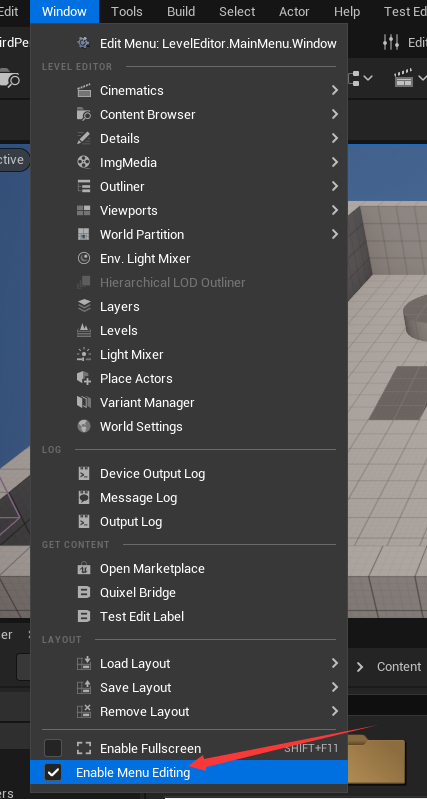
在 Window 窗口中选择开 Enable Menu Edition 即可开启调试

UToolMenu* AddMenu = UToolMenus::Get()->ExtendMenu("LevelEditor.LevelEditorToolBar.AssetsToolBar");
FToolMenuSection& Section = AddMenu->FindOrAddSection("Content");

Section.AddMenuEntry("OpenTestEditTab",
    LOCTEXT("OpenBridgeTab_Label", "Test Edit Label"),
    LOCTEXT("OpenBridgeTab_Desc", "Test Edit Desc."),
    FSlateIcon(TEXT("BridgeStyle"), "Bridge.MenuLogo"),
    FUIAction(FExecuteAction::CreateRaw(this, &FTestEditModule::CreateWindow), FCanExecuteAction())
).InsertPosition = FToolMenuInsert("ImportContent", EToolMenuInsertType::After);
上述代码通过 LevelEditor.LevelEditorToolBar.AssetsToolBar 字符找到对应的 UToolMenu


然后获得名为 Content 的 Section,接下来可以向其中添加 MenuEntry 了